Formats
What is AVIF, and should you use it?
AVIF is the newest mainstream image format, and it can cut a photo to half the size of a JPEG. Here is what it is, where it wins, and where an older format is still smarter.
Last updated July 23, 2026
AVIF in plain terms
AVIF is a modern image format built from the AV1 video codec — the same compression technology that streams video efficiently, applied to a single still frame. That heritage is the whole point: years of work went into squeezing motion video into as few bytes as possible, and AVIF inherits all of it for photos. The result is a format that holds a lot of visual detail in a very small file.
It supports everything you’d expect for the web — full color, transparency (an alpha channel), and a wide range of quality settings from visually lossless down to aggressive compression. For most people the only question that matters is a practical one: is it worth switching to?
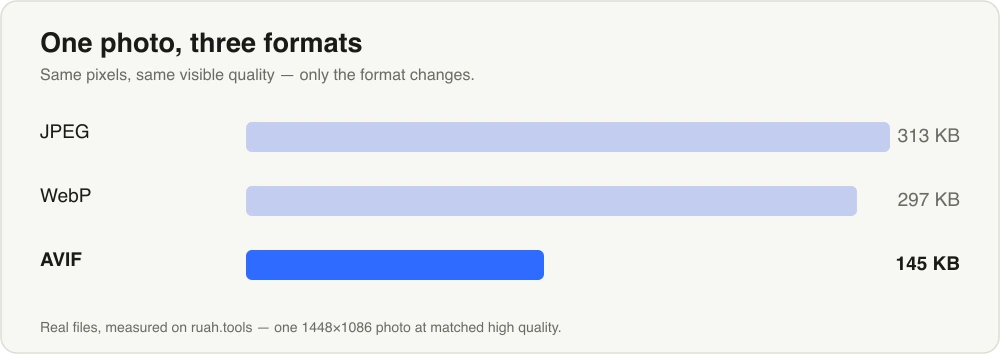
The same photo in three formats. AVIF holds the same visible quality at roughly half the size of WebP.
How much smaller is it?
For a typical photograph at the same visual quality, AVIF is dramatically smaller than JPEG and meaningfully smaller than WebP. Rough numbers hold up well across real images:
| Format | Typical size vs JPG | Encoding speed | Best for |
|---|---|---|---|
| JPG | baseline | fast | Legacy systems, email, old software |
| WebP | −25% to −35% | fast | Everyday web images, the safe default |
| AVIF | −40% to −55% | slower | Photos, hero images, maximum savings |
Those are averages, not guarantees — a flat graphic and a detailed landscape compress very differently. But on real photos, AVIF routinely lands around half the size of the JPEG you started with, and noticeably ahead of WebP, especially in gradients and fine texture where older formats start to show banding.
Browser support today
This used to be the catch, and it mostly isn’t anymore. AVIF decodes in current versions of Chrome, Edge, Firefox, and Safari — the browsers behind the large majority of traffic. If your visitors keep their browsers reasonably up to date, they can see AVIF images without any plugin or fallback.
The honest caveat: “current browsers” is doing real work in that sentence. Very old devices, some email clients, and third-party tools that process images may not decode AVIF yet. If an image has to render literally everywhere, that’s a reason to think twice — more on that below.
The trade-offs
AVIF’s compression comes from more computation, and that shows up in two places.
- It’s slower to encode. Turning an image into AVIF takes noticeably longer than WebP or JPEG. For a handful of photos you won’t care; for a large batch, the extra time adds up.
- Tiny, flat images can get larger. For a small, simple graphic — a flat icon, a logo with a few colors, a line-art badge — the format’s own overhead can outweigh what it saves, so the AVIF can end up bigger than an optimized PNG or WebP. The savings scale with visual complexity, and a 20-color icon just doesn’t have much for AVIF to work with.
Neither is a dealbreaker. They just tell you where AVIF belongs.
When to reach for AVIF
Use it when the file size genuinely matters and the image has detail to compress:
- Photographs — portraits, product shots, landscapes. This is AVIF’s home turf.
- Hero images and large backgrounds — the biggest image on the page is where a −50% cut is felt.
- Galleries and image-heavy pages — savings multiply across every photo the visitor loads.
When WebP or PNG is the smarter pick
- You need it to work everywhere, including old devices and email — ship WebP, which is effectively universal, or plain JPEG for the oldest systems.
- You’re converting a huge batch under time pressure — WebP encodes much faster.
- The image is a flat icon, logo, or simple graphic — try WebP or an optimized PNG first; AVIF’s overhead often makes these no smaller, sometimes bigger.
If you’re weighing the two newer formats directly, the WebP vs AVIF guide breaks the decision down side by side.
Try it without uploading anything
You don’t need a cloud service to test this. Drop a photo into the browser-based converter, export it as AVIF, and compare the size and look against WebP — the quality slider lets you find the point where the file is smallest but still looks right. Everything runs on your own device, so nothing is uploaded and even a big batch stays private.
One note before you commit an entire library: AVIF works from PNG, JPG, WebP, and AVIF sources — HEIC files from an iPhone aren’t supported, so convert those to JPG or PNG first. A good workflow is to convert to WebP as your baseline, then re-export your largest photos as AVIF and keep whichever is smaller. On real photos, AVIF usually wins; on flat graphics, let the file size decide.
Try it now — Convert in your browser, nothing uploaded.